AI Agents Explained: What They Are, How They Work and How Businesses Use Them
AI agents don't just answer questions — they take actions: searching, calling tools and completing multi-step tasks. Here is what they can realistically do and how to use them safely.
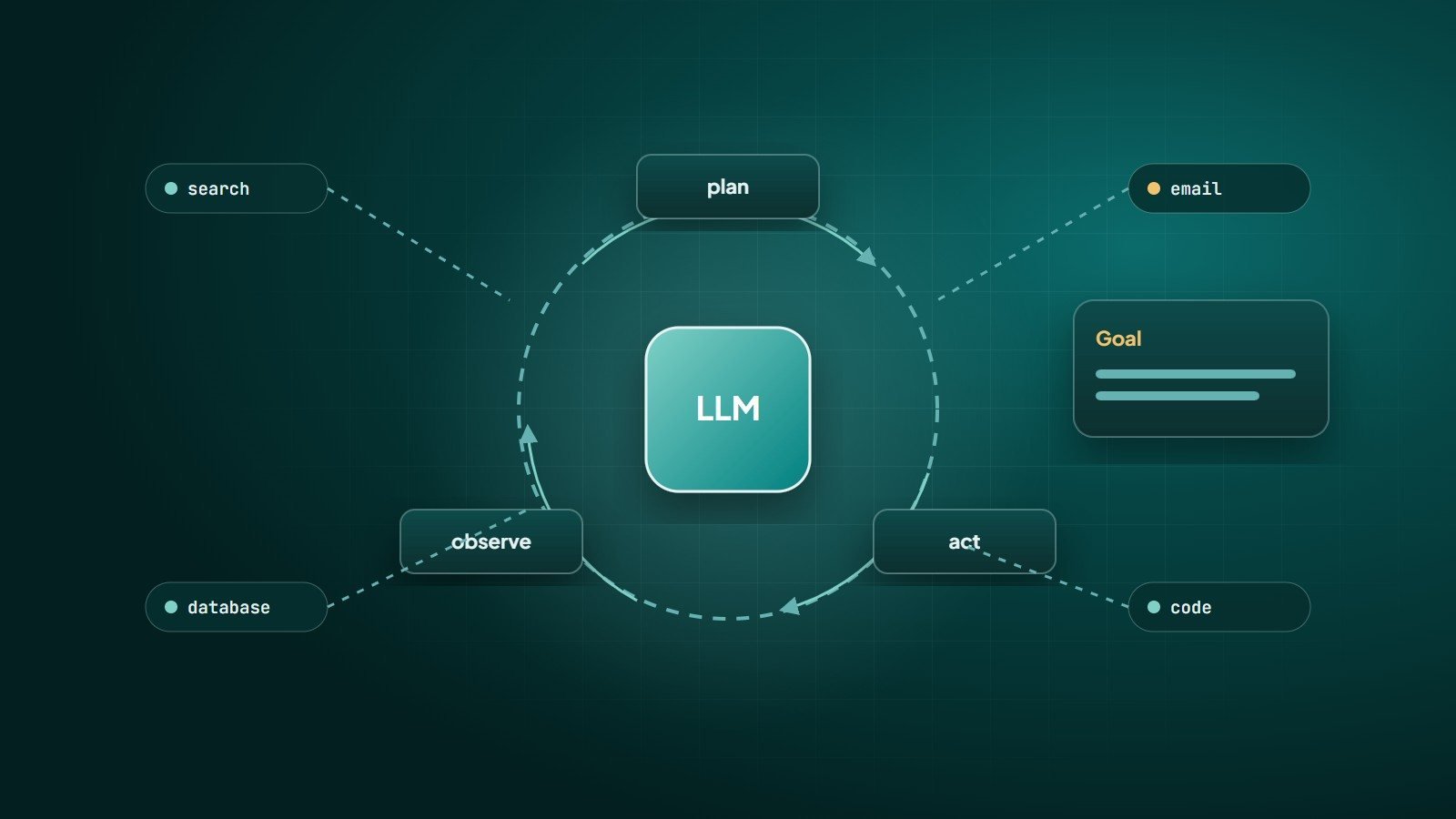
The first wave of generative AI was conversational: you ask, the model answers. AI agents go further. Given a goal, an agent decides which steps to take, uses tools to take them — searching, reading files, calling APIs, writing code — checks the results, and continues until the task is done or it needs help.
Chatbot vs agent
| Chatbot | AI agent | |
|---|---|---|
| Main output | An answer | A completed task |
| Steps | Usually one response | Many steps, chosen by the model |
| Tools | Few or none | Search, databases, APIs, code, files, browsers |
| Autonomy | Low | From supervised to largely autonomous |
How an agent works
At its core, an agent is a loop around a large language model (LLM):
- Goal — "Find all unpaid invoices older than 30 days and draft reminder emails."
- Plan — the model decides the next step.
- Act — it calls a tool, for example querying the accounting system.
- Observe — it reads the tool's result.
- Repeat — it decides the next step based on what it learned, until done.
The model never executes anything itself; the surrounding software executes the tool calls the model requests — which is exactly where permissions and safety checks belong. Standards such as the Model Context Protocol (MCP) have emerged to make connecting models to tools and data sources more consistent.
Realistic business use cases
- Software development — coding agents that read a codebase, implement changes, run tests and fix failures, under developer review.
- Research and analysis — gathering information from many sources and producing a structured summary with citations.
- Customer support — looking up orders, checking policies and resolving routine requests, with handover to staff for exceptions.
- Back-office operations — processing documents, reconciling records, preparing reports and drafting routine communications.
- Data work — querying databases in natural language, cleaning data and building charts.
Where agents struggle
- Reliability over long tasks — small errors can compound across many steps.
- Ambiguous goals — agents do best with clear objectives and clear definitions of "done".
- Cost and speed — many model calls per task add up.
- Judgement and accountability — decisions with legal, financial or personal consequences need humans.
The risks to design for
- Excessive permissions — an agent that can delete data or send money will eventually do something unintended. Grant the minimum access needed.
- Prompt injection — content the agent reads (emails, web pages, documents) may contain hidden instructions. Treat everything the agent reads as untrusted data.
- Data leakage — control what data the agent can see and where it can send it.
- Unreviewed actions — require human approval for irreversible or external actions: payments, deletions, emails to customers.
Give an agent the permissions you would give a capable new employee on their first week — not the keys to everything.
How to adopt agents safely
- Start with a narrow, repetitive task with a clear success measure.
- Give read-only access first; add write actions one at a time, with approval steps.
- Log every step — what the agent saw, decided and did.
- Test with real examples, including tricky and adversarial ones.
- Keep a human in the loop until results are consistently reliable — and for consequential actions, permanently.
- Measure accuracy, time saved and cost per task against the manual process.
Key takeaways
- AI agents pursue goals by planning, using tools and observing results in a loop.
- They are useful today for coding, research, support and back-office tasks with clear boundaries.
- Limit permissions, defend against prompt injection, log everything and keep humans approving consequential actions.
How Wintecsys can help
We build AI assistants and agents connected to your own systems — with limited permissions, approval steps and full logging — for support, operations and internal workflows. See also AI chatbots for business.