What Is DNS and How Does It Work? The Internet's Address Book Explained
Every time you open a website or send an email, DNS quietly translates a name into an address. Here is how it works, what the main records do, and why changes take time to "propagate".
Computers on the internet find each other using numeric IP addresses, such as 203.0.113.10 (IPv4) or 2001:db8::10 (IPv6). People prefer names like example.com. The Domain Name System (DNS) connects the two. It is often called the internet's address book — a distributed, global system that answers billions of lookups every day.
What happens when you type a web address
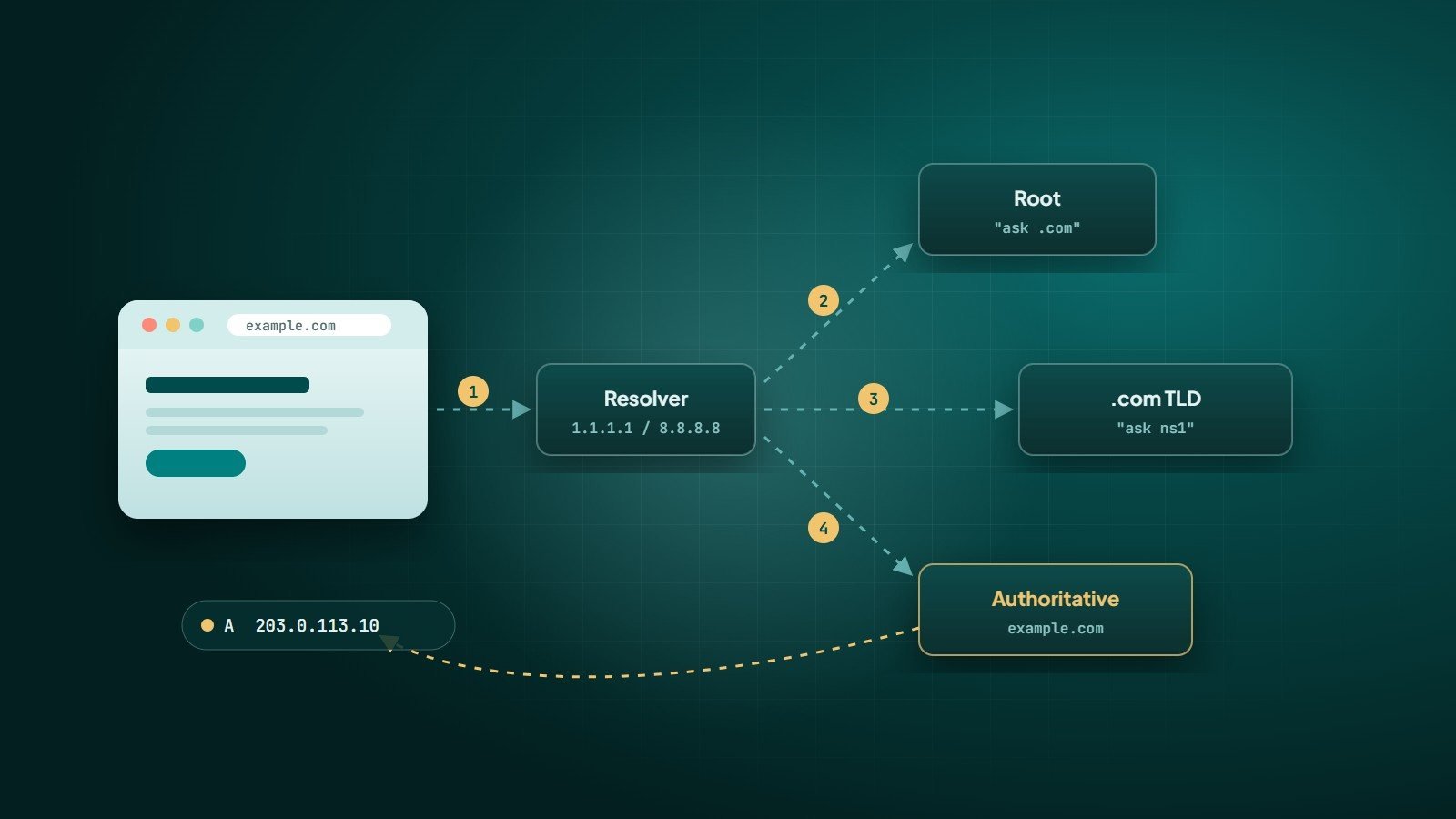
- Local cache — your browser and operating system first check whether they already know the answer from a recent lookup.
- Recursive resolver — if not, the question goes to a resolver, usually run by your internet provider or a public service such as Google (8.8.8.8), Cloudflare (1.1.1.1) or Quad9 (9.9.9.9).
- Root servers — the resolver asks a root server, which replies: "I don't know
example.com, but here are the servers for.com." - TLD servers — the
.comservers reply: "The authoritative name servers forexample.comare these." - Authoritative name server — this server holds the domain's actual records and returns the IP address.
- Answer and cache — the resolver returns the address to your device and remembers it for a period called the TTL. Your browser then connects to the server.
All of this typically happens in milliseconds, and caching means most lookups never need to travel the full chain.
Key DNS record types
| Record | Purpose | Example |
|---|---|---|
| A | Points a name to an IPv4 address | example.com → 203.0.113.10 |
| AAAA | Points a name to an IPv6 address | example.com → 2001:db8::10 |
| CNAME | Makes one name an alias of another | www → example.com |
| MX | Specifies the mail servers for the domain | 10 mx1.mailprovider.com |
| TXT | Free text, used for verification and email security (SPF, DKIM, DMARC) | v=spf1 include:… ~all |
| NS | Lists the authoritative name servers for the domain | ns1.dnsprovider.com |
| CAA | Limits which certificate authorities may issue SSL certificates | 0 issue "letsencrypt.org" |
Registrar, DNS host and web host — three different roles
A common source of confusion is that three separate services may be involved:
- Registrar — where you registered and renew the domain.
- DNS host — the service whose name servers hold your records (set by the NS records at the registrar).
- Web host and email host — the servers your records point to.
They can be the same company or three different ones. When you change name servers, you move all records to the new DNS host — including email records. Forgetting to recreate MX and TXT records is a classic way to break email during a website move.
TTL and "propagation"
Each record has a TTL (time to live) — how many seconds resolvers may cache it. When you change a record, resolvers that cached the old value keep using it until their cached copy expires. This is what people call "DNS propagation": nothing is actually being pushed around the world; caches are simply expiring at different times.
Name server changes can take longer, because the delegation records at the TLD level also have caching periods. That is why a newly moved website can work for one person and not yet for another in a different country or network.
Tip: before a planned change, lower the TTL of the records involved (for example to 300 seconds) a day in advance, so the switch is picked up quickly.
DNS security
- Protect your registrar and DNS accounts with strong passwords and multi-factor authentication — whoever controls DNS controls your website and email.
- Registrar lock prevents unauthorised domain transfers.
- DNSSEC signs DNS records cryptographically so resolvers can detect forged answers.
- Encrypted DNS (DNS over HTTPS or DNS over TLS) protects lookups from being read or altered on the network.
Useful tools
nslookup example.com(Windows, macOS, Linux) ordig example.com(macOS, Linux) to query records.- Query a specific resolver to compare answers, e.g.
nslookup example.com 1.1.1.1. - Online DNS checkers that query resolvers in many countries at once.
Key takeaways
- DNS translates names into IP addresses through resolvers, root, TLD and authoritative servers.
- A, AAAA, CNAME, MX and TXT are the records most websites and email setups depend on.
- "Propagation" is cache expiry; lower TTLs before planned changes.
- Secure your registrar and DNS accounts — they control your online presence.
How Wintecsys can help
We configure domains, DNS, SSL and business email for new and existing websites, and plan migrations so websites and email keep working during the move.
See our cloud & DevOps services or get help with your setup.