Database Indexing Explained: How to Make Slow Queries Fast
A missing index can turn a millisecond query into one that takes seconds and slows your whole application. Here is how indexes work and how to use them well.
Applications often feel fast at launch and slow down months later. One of the most common reasons is that the amount of data grew while the database still searches it the slow way. Indexes are the primary tool for keeping queries fast as data grows.
What an index is
An index is like the index at the back of a book. Without it, finding every page that mentions "TLS" means reading the whole book — in database terms, a full table scan. With an index, you look up the term and jump straight to the right pages.
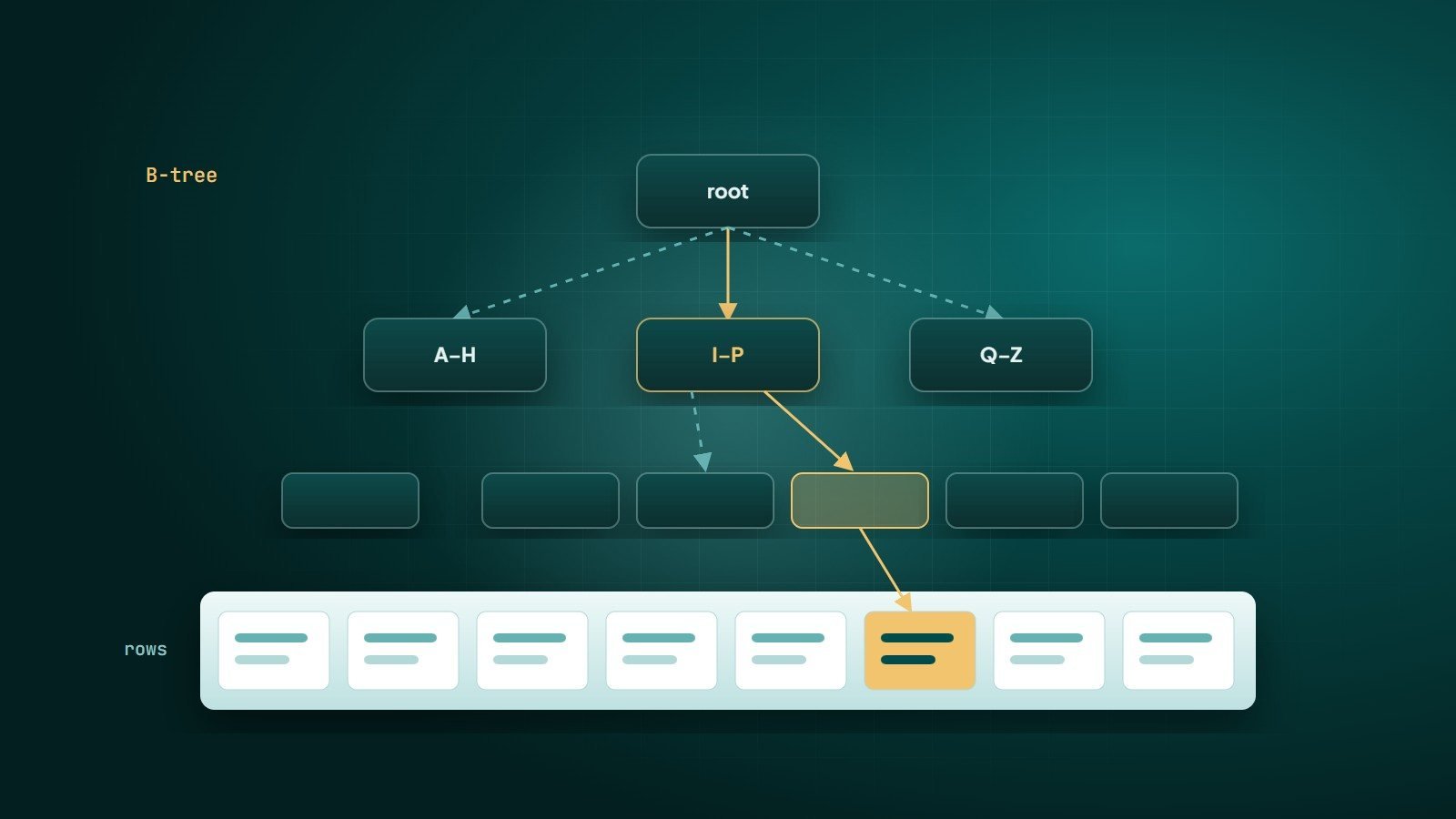
Technically, an index is a separate data structure that stores the values of one or more columns in sorted order, each with a pointer to its row.
How B-tree indexes work
Most relational databases — PostgreSQL, MySQL/InnoDB, SQL Server — use B-tree indexes by default. A B-tree is a balanced tree: the database starts at the root, follows branches by comparing values, and reaches the right leaf in a handful of steps, even for millions of rows. Because values are sorted, B-trees support:
- Equality lookups:
WHERE email = 'a@b.com' - Range queries:
WHERE created_at >= '2026-01-01' - Sorting:
ORDER BY created_at DESC - Prefix matches:
WHERE name LIKE 'Ahm%'(but notLIKE '%med')
Creating an index
-- Speed up login lookups by email
CREATE UNIQUE INDEX idx_users_email ON users (email);

-- Speed up "latest orders for a customer"
CREATE INDEX idx_orders_customer_date ON orders (customer_id, created_at);
Composite indexes: column order matters
An index on (customer_id, created_at) is sorted first by customer, then by date within each customer. It works well for:
WHERE customer_id = 42WHERE customer_id = 42 AND created_at >= '2026-10-01'WHERE customer_id = 42 ORDER BY created_at DESC
It generally does not help a query filtering only on created_at, because the dates are not globally sorted — this is the leftmost prefix rule. A practical guideline: put columns used with equality conditions first, then columns used for ranges or sorting.
Covering indexes
If an index contains every column a query needs, the database can answer from the index alone without visiting the table — a covering index (PostgreSQL calls this an index-only scan). PostgreSQL and SQL Server let you add extra columns with INCLUDE.
Use EXPLAIN — don't guess
Every major database can show its query plan: how it intends to execute a query.
EXPLAIN ANALYZE
SELECT id, total FROM orders
WHERE customer_id = 42
ORDER BY created_at DESC
LIMIT 20;
Look for full scans on large tables (Seq Scan in PostgreSQL, type: ALL in MySQL), large numbers of rows examined compared with rows returned, and separate sort steps on big result sets. Enable the slow query log to find which queries to look at first.
Why indexes sometimes aren't used
- Functions on the column:
WHERE LOWER(email) = …cannot use a plain index onemail(use an expression index or store normalised values). - Type mismatches, such as comparing a text column with a number.
- Leading wildcards:
LIKE '%term'. Use full-text search instead. - Low selectivity: if a condition matches a large share of the table, a scan can genuinely be faster, and the optimiser will choose it.
- Outdated statistics — run
ANALYZEso the optimiser has accurate information.
The cost of indexes
Indexes are not free:
- Every
INSERT,UPDATEandDELETEmust also update each index, slowing writes. - They use disk space and memory.
- Duplicate and unused indexes add cost with no benefit.
Index for the queries your application actually runs, and periodically remove indexes that are never used.
A practical routine
- Index primary keys (automatic), foreign keys and columns used in frequent filters and joins.
- Turn on slow query logging.
- For the worst queries, read the EXPLAIN plan and add or adjust indexes.
- Measure before and after.
- Review unused indexes every few months.
Key takeaways
- Indexes turn full table scans into fast lookups, using B-trees by default.
- In composite indexes, order matters: equality columns first, then range or sort columns.
- Use EXPLAIN and slow query logs to decide; don't guess.
- Indexes speed reads but cost writes and space — index deliberately.
How Wintecsys can help
We audit and tune application performance — slow queries, indexes, caching and database design — so your website or app stays fast as your data and traffic grow.
See our maintenance services or ask us to speed up your app.